New
MEY CHECK
Mix referencing that teaches.
€35 once. One price, no subscription.
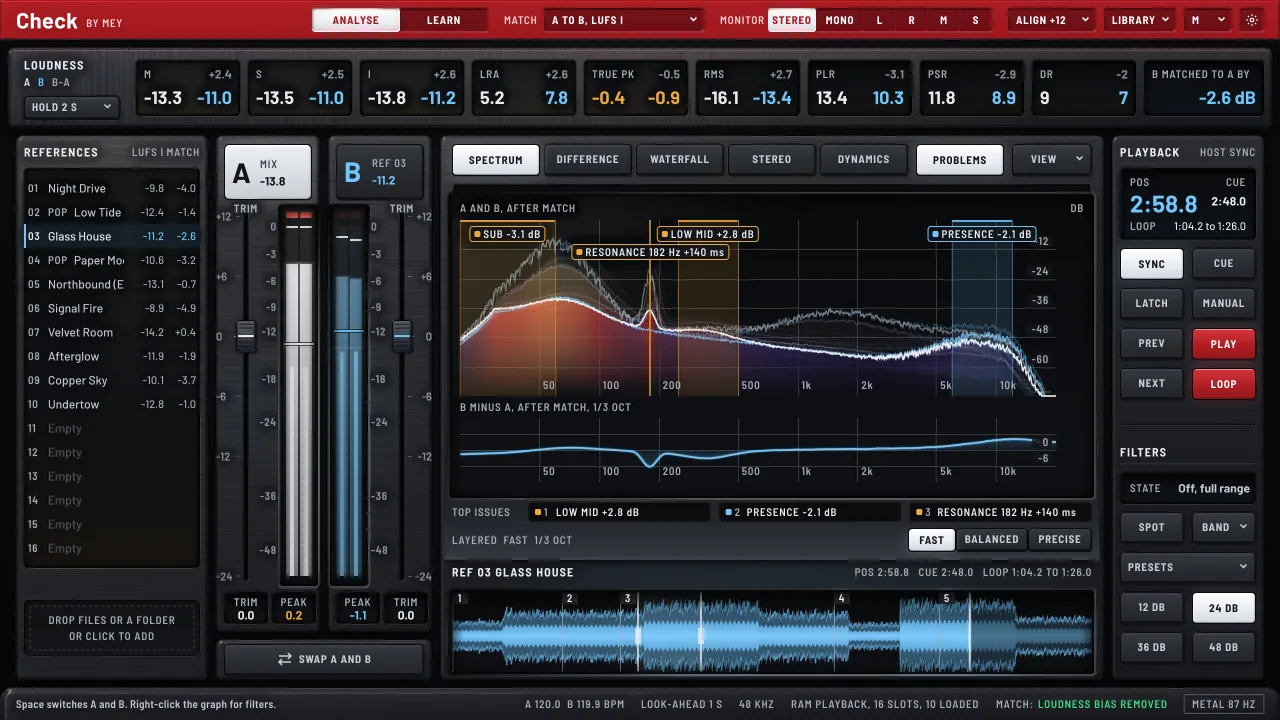
Load up to sixteen references, press Space and hear your mix against them at exactly the same loudness, so you judge balance, not volume. CHECK shows where your mix differs from the records you want it to stand next to, and LEARN trains your ears to hear it.
Get the highlights.
 Problems lensThe problems, drawn where they are.
 WaterfallSee it coming before you hear it.A sonogram where kicks, bass notes, pads and hi-hats read as separate islands, and a resonance shows as a streak that stays bright where the reference fades.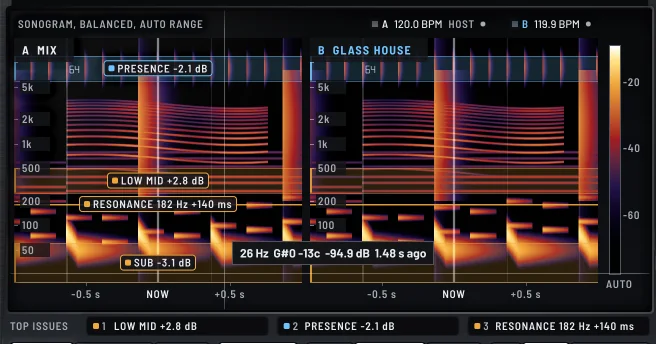
Take a closer look.
Laid out like a console.A spectrum you can read at a glance.The problems, drawn where they are.See it coming before you hear it.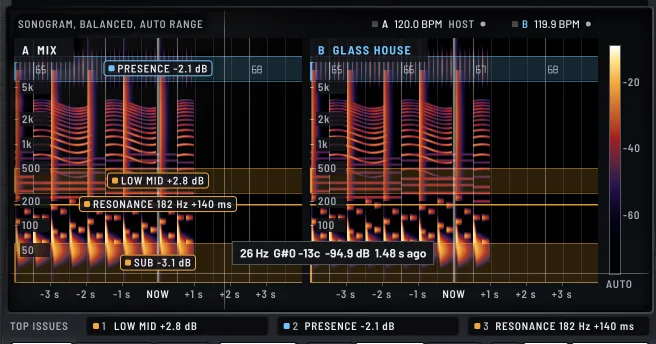 See it coming before you hear it.
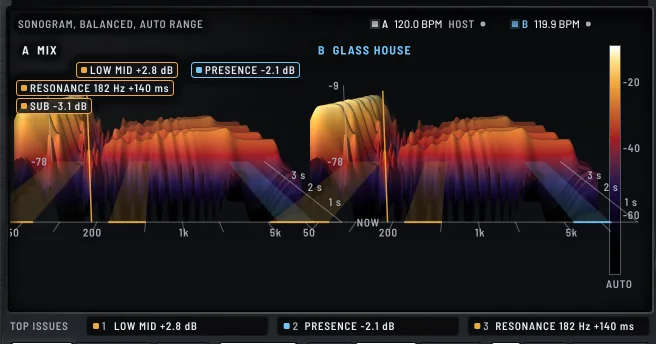 The music as a landscape.
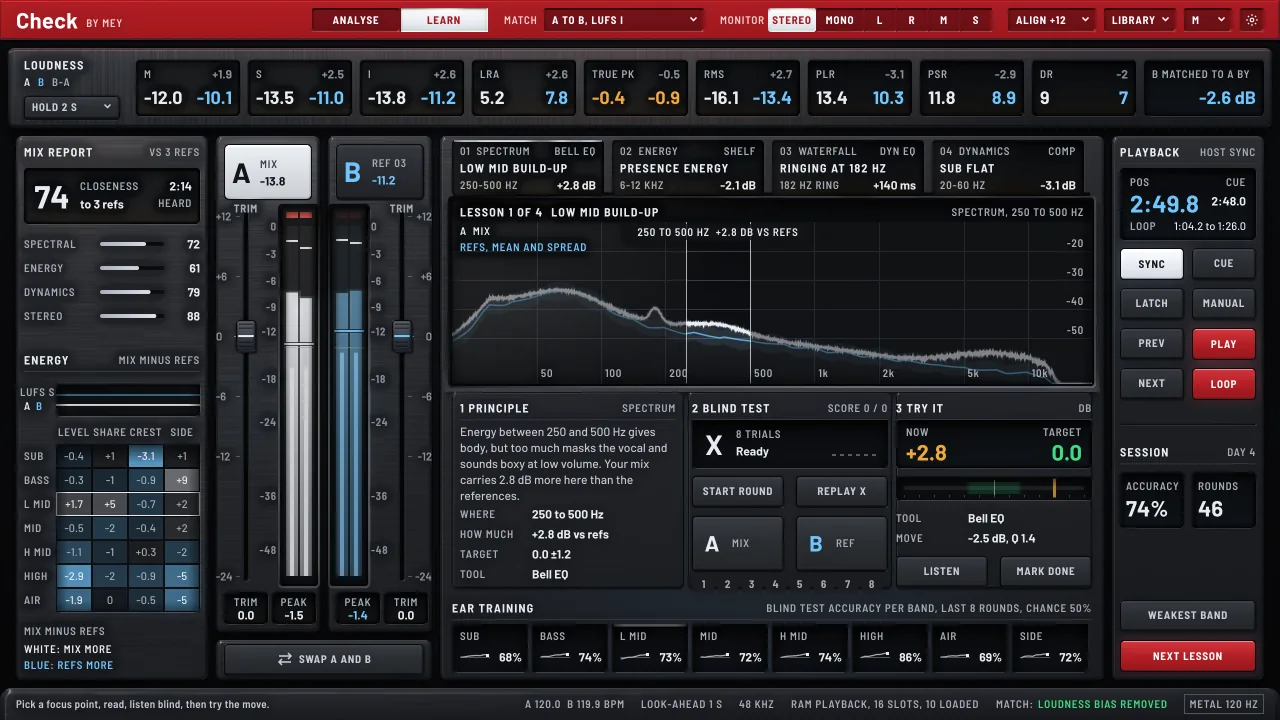 A Coach that learns from your references.
References
Sixteen references, played from memory.
CHECK sits last on your mix bus. A is your mix, B is a finished track you drop into one of sixteen slots. Each one is read into memory, converted to your session’s sample rate and measured once, by the same code that measures your mix.
Playing from RAM means no dropouts and instant switching. WAV, AIFF, FLAC, Ogg Vorbis, MP3 and M4A/AAC all load. References, cues, loops and offsets are saved with your host session.
Loudness match
Hear balance, not volume.
Louder sounds better, and two versions 1 dB apart are easily heard as better and worse. So CHECK matches the loudness of A and B live, and tells you how much it moved: “B matched to A by -2.6 dB”.
A to B, B to A, both to a target of -11, -14, -16 or -23 LUFS, or to the quietest. On LUFS I, LUFS S, RMS or Peak. The match glides over about 250 ms and holds through silence.
Switch and play
Press Space. That is the whole comparison.
Space switches between A and B with a 10 ms equal-power crossfade, so it never clicks. Sync, Cue, Latch or Manual decide how the reference plays against your host. Double-click the waveform for a cue, drag across it for a loop.
Load an earlier mix of your own song and press Align now: CHECK finds where it fits by cross-correlation and plays it sample-accurate against the new one. Yesterday’s mix and today’s, at the same bar, at the same loudness.
Console
Laid out like a console.
A meter bridge runs across the top, every loudness value in a lit window of its own: momentary, short-term and integrated, loudness range, true peak, RMS, PLR, PSR and DR, with A in white and B in blue.
A and B each have a channel strip with peak and RMS behind smoked glass, clip lamps that latch and a TRIM fader. The meters miss no peak. SWAP A AND B puts the reference on A, for mastering engineers who keep it as the standard.
Spectrum
A spectrum you can read at a glance.
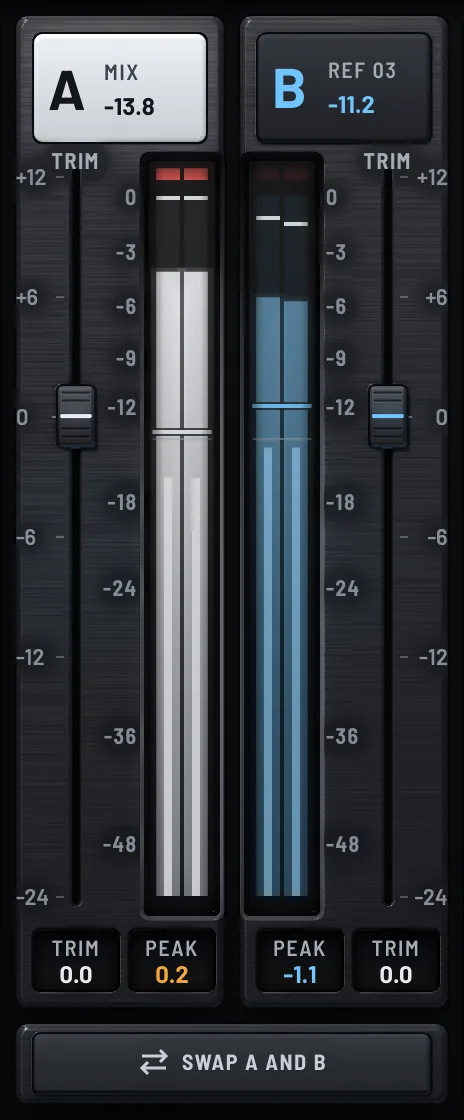
Your mix in white, the reference in blue, from 20 Hz to 20 kHz, tilted so pink noise reads as a flat line. The last 1.5 seconds recede behind the curve, and a corridor shows where your loaded references sit. A mix inside the band is balanced like them.
Hover for the frequency, the note with its cents and the level. The Difference view gives B minus A the whole screen.
Problems lens
The problems, drawn where they are.
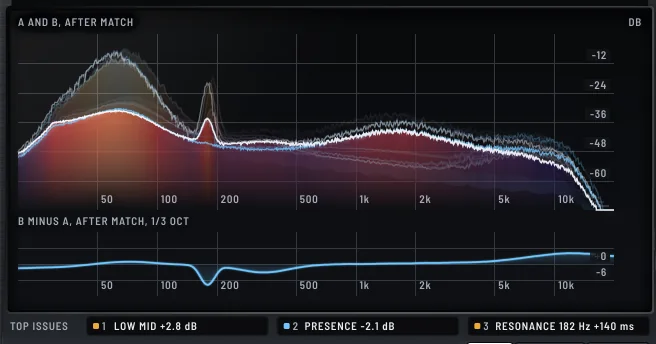
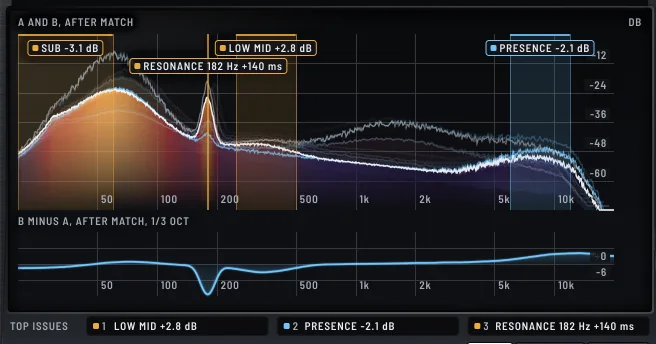
With PROBLEMS on, the main findings are drawn on the graph: a band with a short label, “LOW MID +2.8 dB”, or a pin for a resonance. Amber is the worst. Red is never used, because red means clipping.
Top issues lists the three worst as chips. Click one and you hear that range, test yourself blind and try the move.
Waterfall
See it coming before you hear it.
A sonogram where kicks, bass notes, pads and hi-hats read as separate islands, and a resonance shows as a streak that stays bright where the reference fades. With the look-ahead on, CHECK delays its output and tells the host, so the analysis runs ahead: you see a drop or a hit before it reaches your ears.
Beat lock fits four bars across the window with a line on every beat. On synthetic test tracks every tempo read within 0.15 BPM.
3D terrain
The music as a landscape.
Press 3D and the sonogram becomes a lit terrain: now at the front edge, the last seconds moving back into the fog, level as height and colour. Drag to turn it, scroll to zoom. Switch back to Flat whenever you want to read a value exactly.
Stereo and dynamics
Width, phase and punch.
A goniometer per stream that glows like phosphor, a correlation meter from -1 to +1, and the width as the side share of the energy. Dynamics compares your mix with your references band by band: level, energy, crest and side share.
Click anywhere on the spectrum and you hear only two octaves around that frequency, on A and on B. MONITOR adds Mono, L, R, Mid and Side.
LEARN and the Coach
A Coach that learns from your references.
Press LEARN. The Coach works out the mean and the spread of every measure across your references, finds where your mix lies outside that corridor and gives each finding a short lesson: the principle, a blind test of eight trials, and a gauge to watch while you make the move. Your results build an ear-training history per band.
Honestly stated: it is a statistical model of your references in this session, not a trained neural network and not a judge of taste. It shows you where to listen; your ears decide.
Accuracy
Loudness you can trust, measured.
Loudness to ITU-R BS.1770-4, meters as EBU Tech 3341 describes, loudness range to EBU Tech 3342, true peak four times oversampled. The same meter measures your mix live and each reference as a whole file.
Against signals whose answer is known: a 1 kHz stereo sine at -23 dBFS reads -22.993 LUFS, EBU Tech 3342 case 1 reads 10.0 LU, and a reference 6 dB louder is matched by -6.000 dB.
Drawn on the GPU
Smooth at your screen’s refresh rate.
The live displays are drawn on the graphics card with Metal, at 60 Hz on most screens and 120 Hz on a ProMotion display. With Lit surface on, the console is lit in real time: brushed aluminium, soft-touch keys and smoked glass.
It costs your mix nothing. On an Apple M1 Pro the audio thread uses about 0.3 % of one core, the analysis 3 to 7 % on a thread of its own.
Tech specs
- Formats
- VST3, Audio Unit, Standalone · macOS 10.15 and later, Apple silicon and Intel
- Channels
- Stereo out; stereo or mono in (mono as dual mono)
- Latency
- The look-ahead you choose: 0, 0.5, 1 (default) or 2 s, reported to the host; 0 samples with the look-ahead off
- References
- 16 slots, played from RAM; WAV, AIFF, FLAC, Ogg Vorbis, MP3, M4A/AAC, and CAF on macOS
- A/B switch
- Equal-power crossfade, 10 ms; Sync, Cue, Latch, Manual; cues, loops, alignment by cross-correlation
- Loudness match
- A to B, B to A, Both to target (-11, -14, -16, -23 LUFS), To quietest, Off; LUFS I, LUFS S, RMS or Peak; at most 24 dB
- Loudness
- ITU-R BS.1770-4, EBU Tech 3341, EBU Tech 3342 (LRA); true peak 4 times oversampled
- Views
- Spectrum, Difference, Waterfall (flat with look-ahead and beat lock, or 3D terrain), Stereo, Dynamics; Problems lens
- LEARN
- The Coach (a statistical model of your references), lessons, blind tests, ear-training history
- CPU
- Audio thread 0.31 % of one core, analysis 3.1 to 7.0 % on its own thread
48 kHz, 512 samples, Apple M1 Pro - Graphics
- Metal, at the screen’s refresh rate; OpenGL and 2D as fallbacks
Questions
Which DAWs does it work in?
Any host that loads VST3 or Audio Units: Logic, Ableton Live, Cubase, Studio One, Reaper and others, and there is a standalone app. There is no AAX version, so it does not load in Pro Tools.
Does CHECK change my mix?
No. There is no EQ or compressor in the signal path. With your mix selected, the listen band off and the trim at 0 dB, the output is your input, delayed by the look-ahead when that is on.
What does the look-ahead do to latency?
It delays the output by exactly the look-ahead (1 s by default) and reports it to the host, so delay compensation keeps everything in time. While you record or play live, switch it off: the latency is then 0 samples.
What is the Coach, exactly?
A statistical comparison with the references you loaded in this session. It is not a trained neural network, it sends nothing anywhere, and it knows nothing beyond your references. Pick references that fit the song.
Which computers does it run on?
For now the Mac: macOS 10.15 and later, on Apple silicon and Intel, as VST3, Audio Unit and the standalone app.
What do I get for the trial?
The whole plug-in, for 7 days on each computer, with nothing switched off. When the trial ends CHECK outputs silence until you enter a key. Your sessions, references, cues and loops are kept.
What does a licence buy?
One licence key for two computers, in VST3, Audio Unit and the standalone app, for €35 once. No introductory offer, no subscription, no dongle.
Does it need the internet?
To start the trial and to activate a computer, yes. Once a day it asks whether a newer build is out. No audio, no file names and no analysis ever leave your computer.
How do I pay, and when do I get the key?
On Ko-fi. The key is emailed to you, usually within a minute, with the download links. Lost it? The licence card and the buy page can both send it again.
Can I get my money back?
The key is delivered right away, and from that moment the right of withdrawal for digital content ends, as the refund policy explains. That is exactly why there is a free trial.
Try it free for 7 days.
Download, load a reference, press Space.