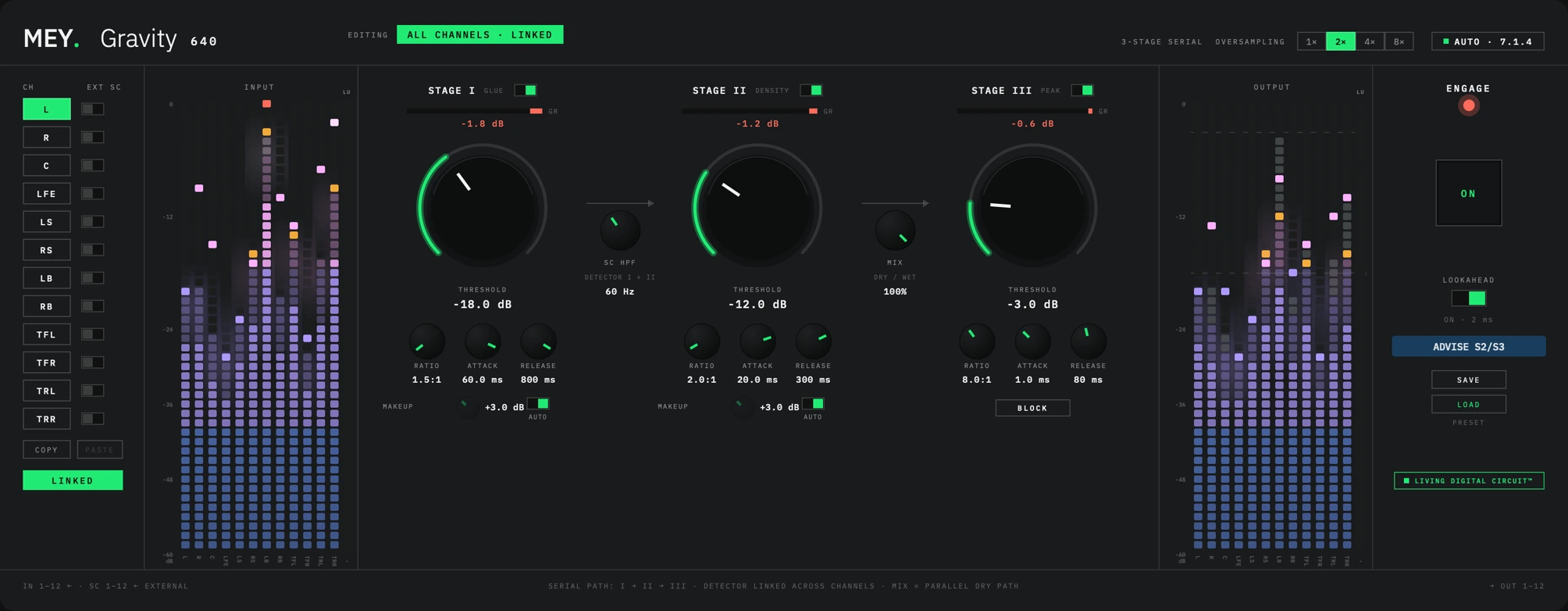
A three-stage mastering compressor for surround and stereo classical masters. Glue, Density and Peak in series, tuned on real orchestral material, with a coupled detector that keeps the image standing still.
“An exceptional plug-in. Not a compressor, not a limiter: it controls dynamics inaudibly and without colouration. Outstanding specifications. A must-have for any engineer who takes their craft seriously.”
 Jos BoerlandAliud
Get the highlights.
What it is
Three stages, one honest chain.
Built for classical and acoustic repertoire and transparent by default. The character lives in the ballistics of each stage, not in added harmonics.
One gain-reduction value drives every channel: the loudest one controls the whole image, so it never tilts under compression. LFE follows that gain but never drives it. PER CH gives every channel its own settings and detector instead.
Channels and routing
Mono to 7.1.4, detected automatically.
MEY 640 reads the host’s layout and sets itself up: mono, stereo, 5.1, 7.1, 5.1.4 or 7.1.4. Channels outside the layout dim; there is nothing to set by hand. An external sidechain in the same layout can key any channel’s detector from another source.
The three stages
Glue, Density, Peak.
The defaults are deliberately gentle. Glue and Density listen to RMS with a smoothed gain, so a held double-bass note or an organ pedal isn’t chased. Peak keeps a plain peak detector on purpose: a ceiling that follows the average level is not a ceiling.
BLOCK turns Peak into a true brickwall: an effectively infinite ratio, instant attack, hard knee. With lookahead on, the ceiling holds to the sample.
Release and makeup
Release that listens to the programme.
A short, shallow reduction recovers on a fraction of the set time, a sustained passage on the full time: about 161 ms after a short peak against 789 ms after a held passage, from the same setting. The hall doesn’t breathe with the compressor.
Glue and Density each have MAKEUP with its own AUTO, unit-wide so the surround image never tilts. Peak has none: its threshold is the output ceiling.
SC HPF and MIX
Two controls beside the chain.
SC HPF feeds a high-passed copy to the Glue and Density detectors only, so a pedal note can’t drive the whole mix. MIX blends the processed signal with a phase-aligned dry copy. Below every threshold wet equals dry, so the blend stays at the same loudness as you move it.
Metering
Built against broadcast standards.
Input and output ladders on a 48-cell grid in four named zones. A real over latches red until you clear it, so a missed clip can’t hide behind the next quiet passage. Each stage’s reduction hangs from its own level bar, and a BS.1770-4 loudness column runs beside each meter bank, measured before and after the chain.
ADVISE S2/S3
A starting point, not a suggestion engine.
One button computes Density and Peak from Glue’s current settings: a fixed formula, no listening, no machine learning. The same Glue setting always gives the same advice, and you tune from there by ear.
Linked, per channel, presets
One image, or twelve channels of your own.
LINKED shares one set of settings and one detector across the bus; PER CH hands both to each channel. COPY and PASTE move a channel’s settings to another, or to all of them while linked. SAVE PRESET stores the whole unit, in one user slot per installation.
Tech specs
- Formats
- VST3, Audio Unit, Standalone
- Platforms
- macOS (Apple silicon) · Windows
- Channel layouts
- Mono · Stereo · 5.1 · 7.1 · 5.1.4 · 7.1.4
- Channel order
- L R C LFE LS RS LB RB TFL TFR TRL TRR
- Stages
- I GLUE: −18 dB · 1.5:1 · 60 ms · 800 ms · soft knee
II DENSITY: −12 dB · 2:1 · 20 ms · 300 ms · medium knee
III PEAK: −3 dB · 8:1 · 1 ms · 80 ms · hard knee - Sidechain
- One external bus, source chosen per channel
- Processing
- Floating point, headroom above 0 dBFS
- Oversampling
- 1×, 2×, 4×, 8× (default 2×)
- Lookahead
- 2 ms, on by default
- Metering
- 48-cell grid, BS.1770-4 loudness
- Version
- 0.1.0, free, no account
Questions
Why does the threshold knob turn the other way?
All three THRESHOLD knobs read in the direction of compression. Fully left is +12 dBFS, no compression at all; turning right lowers the threshold. Up always means more, like every other knob on the panel.
Can I rely on BLOCK as a hard ceiling?
Yes, with lookahead on. In 44.1 or 48 kHz sessions, set oversampling to 8× for that pass.
How do I install it?
On macOS, double-click the signed installer; it puts the VST3 and the Audio Unit in your user plug-in folders and the standalone app in /Applications. If Gatekeeper warns you, right-click the installer and choose Open once. On Windows, unzip the download and copy the VST3 into C:\Program Files\Common Files\VST3. Then insert MEY 640 on a bus and check that the AUTO badge shows the layout you expect.
Is this the finished version?
This is 0.1.0, an early public build, and more is coming. Feedback is welcome at info@wearemey.com.
Free to use. Not free to build.
If MEY 640 has earned a place in your sessions, a coffee helps keep the next one coming. Entirely optional.